
We recently tackled a long-standing challenge for University of Michigan researchers and authors: locating publications covered under transformative (also known as read and publish) agreements—offering either a discount or a full waiver for article processing charges (APCs) to publish as open access.
A question frequently asked of Library colleagues at faculty orientation sessions across our campuses has been: "How do I find journals covered by our Open Access publishing agreements?"
Until recently, the answer involved a bit of a scavenger hunt through various publisher title lists—a process that often led to more questions than it answered (and more frustrated emails to librarians).
To change this messy situation, we set out to build a single-page application: Journals with Article Processing Charge (APC) Agreements.
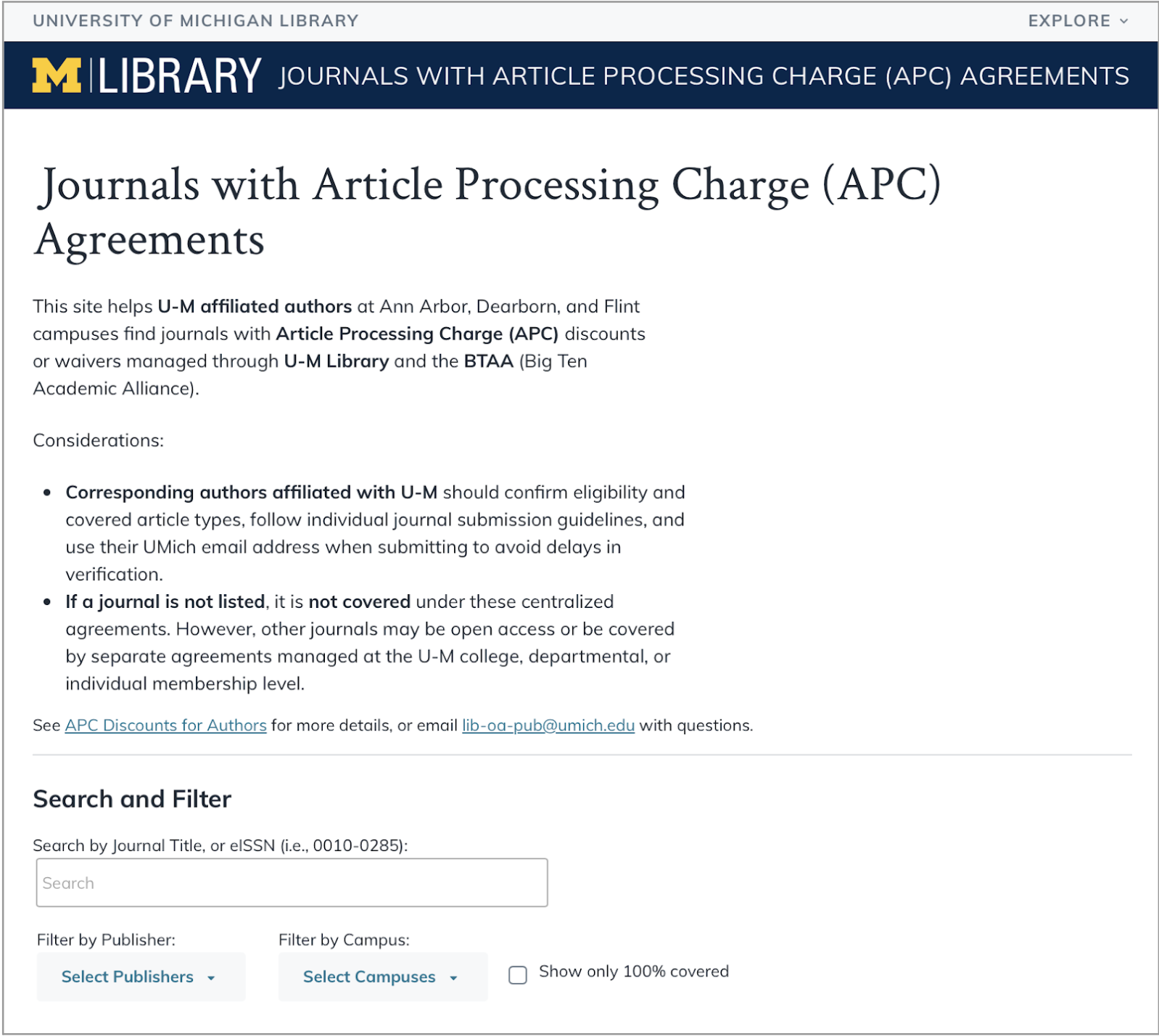
This single-page application includes a search box, filters for publisher and U-M campus, and a checkbox to limit to only fully-covered publications.
Getting to a prototype
The project started with a data-wrangling effort. Together with the library's Open Ecosystem Committee, we gathered nearly 13,000 journal titles from over 20 publisher agreements. We aligned journal identifiers—titles and electronic ISSNs (eISSNs)—alongside details like waiver/discount amount, coverage timeframe, and U-M campus eligibility using data that was consistently available across publisher lists.
To try out the data format, I prototyped the list using Google’s Looker Studio. This version gave a sense of how a filterable list might feel in practice. However, we hit a snag in that Looker didn’t meet our WCAG 2.2 AA accessibility standards and couldn't be customized enough to get there.
As we contemplated other platforms, senior developer Albert Bertram stepped in with a pivot to DataTables, a code library that handled the ~13,000 rows of data with ease. Front-end developer Josh Salazar built an accessible, efficient front end with U-M branding to complete the updated prototype.
The code repository for this application is shared on GitHub.
What we learned in usability testing
With a working prototype, we put the preview site in front of real people, inviting three campus users and three librarians to take it for a spin. Watching them interact with the tool revealed where our initial design was technically strong, but onscreen information didn't perfectly match users’ mental models. Their feedback helped shift the project from functional to usable.
Following are some of the informational changes we made due to their valuable input:
- Clarifying the scope: There is quite a lot of nuance in open access publishing, with some journals having a fully open policy and others tied to institutional or membership agreements. Clarifying that the scope of this site was only centrally managed agreements acknowledges there may be journals not listed for which an author may be eligible.
- Value of librarian’s notes vs. publisher links: Originally, we thought about linking journals directly to the publisher’s website for efficiency. But our testers pointed out that publisher sites are often a maze. Instead, we shifted to linking to publisher notes in our Discounts and Waivers Research Guide, with links to the publisher site from there. This allows librarians to add vital context—like specific waiver instructions or "gotchas"—that a corporate site might obscure, such as reminders to check the publisher for article-type exceptions to what is fully covered.
- Default order: Our initial build sorted everything by eISSN. Users immediately let us know that isn't how they think—they think in titles. We shifted the default sort order to Journal Title, so the list feels orderly the moment you land on the page. (DataTables includes sortable columns, so users can still sort by eISSN if they wish.)
- Nuance of "Coverage Years": We found that the phrase “coverage years” was confusing to authors. We added a footnote to clarify that, for most publishers, it’s the article acceptance date that defines the "season" of coverage. Links to footnotes about coverage years and other important clarifications appear above the results table.
- Linking to a "Source of Truth": Because many journals have similar names, we turned the eISSN into a live link to the International ISSN Portal. It’s a small technical detail that lets authors verify the journal details and ensures they have located the publication they had in mind.
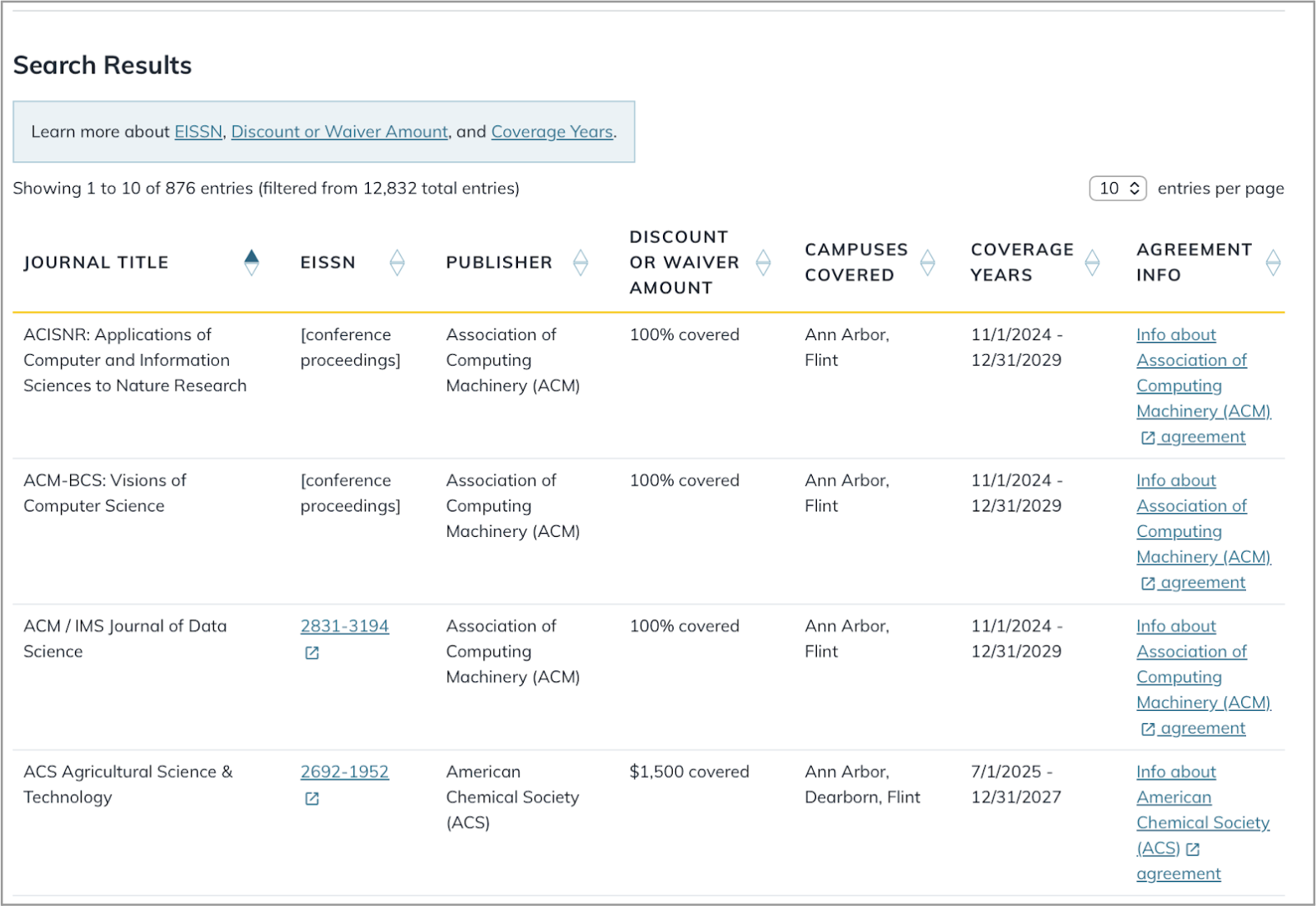
Searching by eISSN, journal title, or keywords instantly narrows the results. We’ve also included highlighted links to important footnotes for further clarification.
The "no results" safety net
One of the most important things we fixed was what happens in an "empty search." In early versions, if you searched for a journal and it wasn't there, it was unclear whether the journal wasn’t listed or whether a typo or your search filters were blocking possible matches.
Based on user feedback, we added a clear message. If a search comes up empty, the site now helps the user troubleshoot.
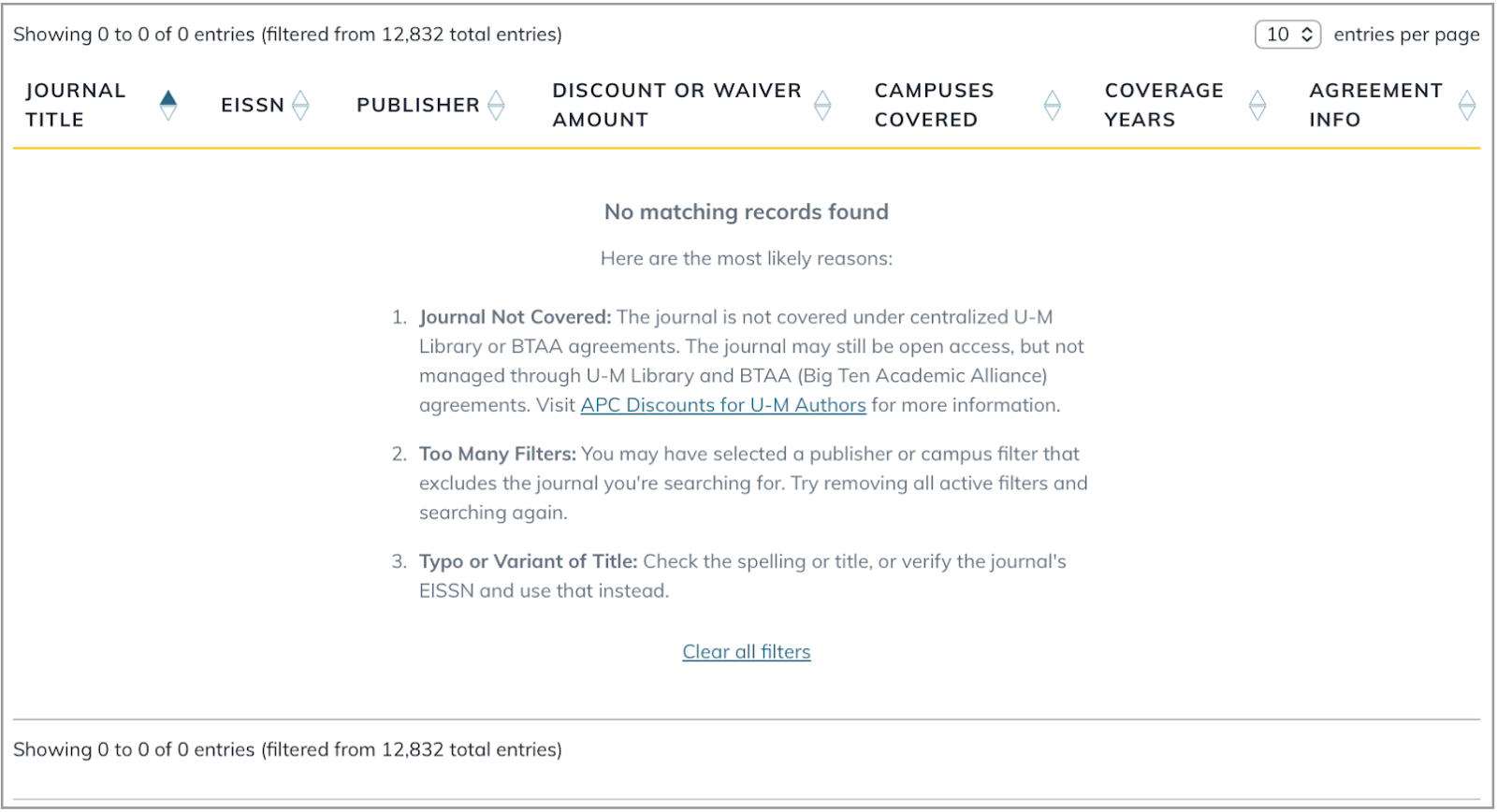
A “no results” message helps catch errors and clarify the scope of publications available in this system.
The outcome
Our team really enjoyed solving this specific, narrowly-scoped problem. It’s a reminder that sometimes the most valuable thing we can do is take a simple approach and, through usability testing and user feedback, get the details right.
Since launch, the responses like these from our colleagues have been the best kind of reward:
- “I already shared it with my department/faculty.”
- "I used to just email and ask [specific colleague’s name] because I kept getting stuck. I’m so grateful for this."
- "I'm frequently asked to verify that a journal really does count, so this is very nice."
- “Added to my [browser] favorites!”