
This is the second post in a series on the University of Michigan Digital Preservation Lab's new normalization workflows for born-digital materials. The first post, by Digital Preservation Unit Lead Lance Stuchell, covers the institutional context and decision to normalize DOC and DOCX files – start there if you haven't already!
Hi! I'm Luciana, a Digital Preservation Lab intern at the University of Michigan Library. Lance's post laid out why we decided to normalize Word documents to PDF/A. My job was to figure out how: which format variant, which tool, and what we'd actually lose (or gain) in the process. This post shares what I found.
A quick note on scope: The test collection we worked with consisted primarily of DOC and DOCX files. While that's our primary use case here, the workflows, evaluation criteria, and format comparisons we developed may be largely generalizable to other born-digital text document types.
Why PDF/A-2u specifically?
PDF/A is not a single format. It's a family, and the variants matter more than they might initially appear. The two we focused on were PDF/A-2b and PDF/A-2u. Both are valid for preservation. The difference comes down to Unicode.
PDF/A-2b guarantees visual fidelity: the document will look the same decades from now. What it does not guarantee is that the text inside is meaningfully searchable, copyable, or readable by a screen reader.
PDF/A-2u adds a Unicode text mapping requirement, which means the characters in the file are mapped to actual Unicode code points – making the text extractable, searchable, and accessible in a way that 2b does not promise.
For a collection that includes documents in Portuguese and Chinese (as ours does) that distinction is not academic. A preservation file where non-Latin characters can't be reliably copied or searched is a limited access file. Since our goal was a format that could serve both preservation and access (as Lance described), PDF/A-2u became the clear choice.
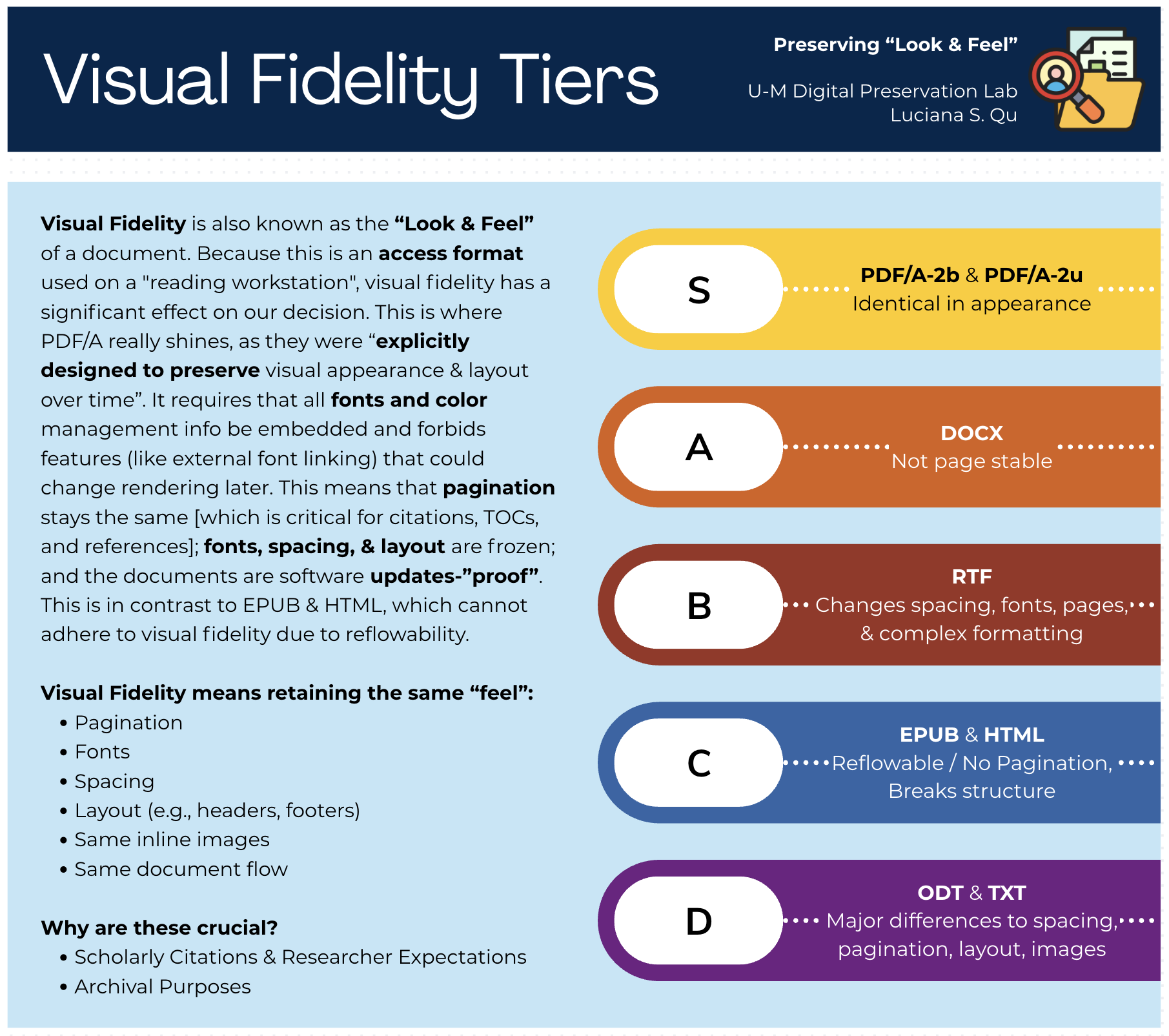
Figure 1. Visual Fidelity Tiers: How well each format preserves the “look and feel” of the original document. PDF/A-2b & PDF/A-2u both earned an S-tier rating. View in Repository

We also evaluated EPUB3, HTML, ODT, RTF, and plain text as candidates early in the research. Each had real strengths:
- EPUB3 is highly accessible, and HTML widely render-able. But both sacrifice layout and pagination, which matters for documents where structure carries meaning.
- RTF and ODT introduced inconsistent formatting drift across tools.
In the end, PDF/A-2u offered the best combination of visual fidelity, text extractability, accessibility potential, and format longevity – with the caveat that accessibility still requires human review beyond what any automated tool can guarantee.
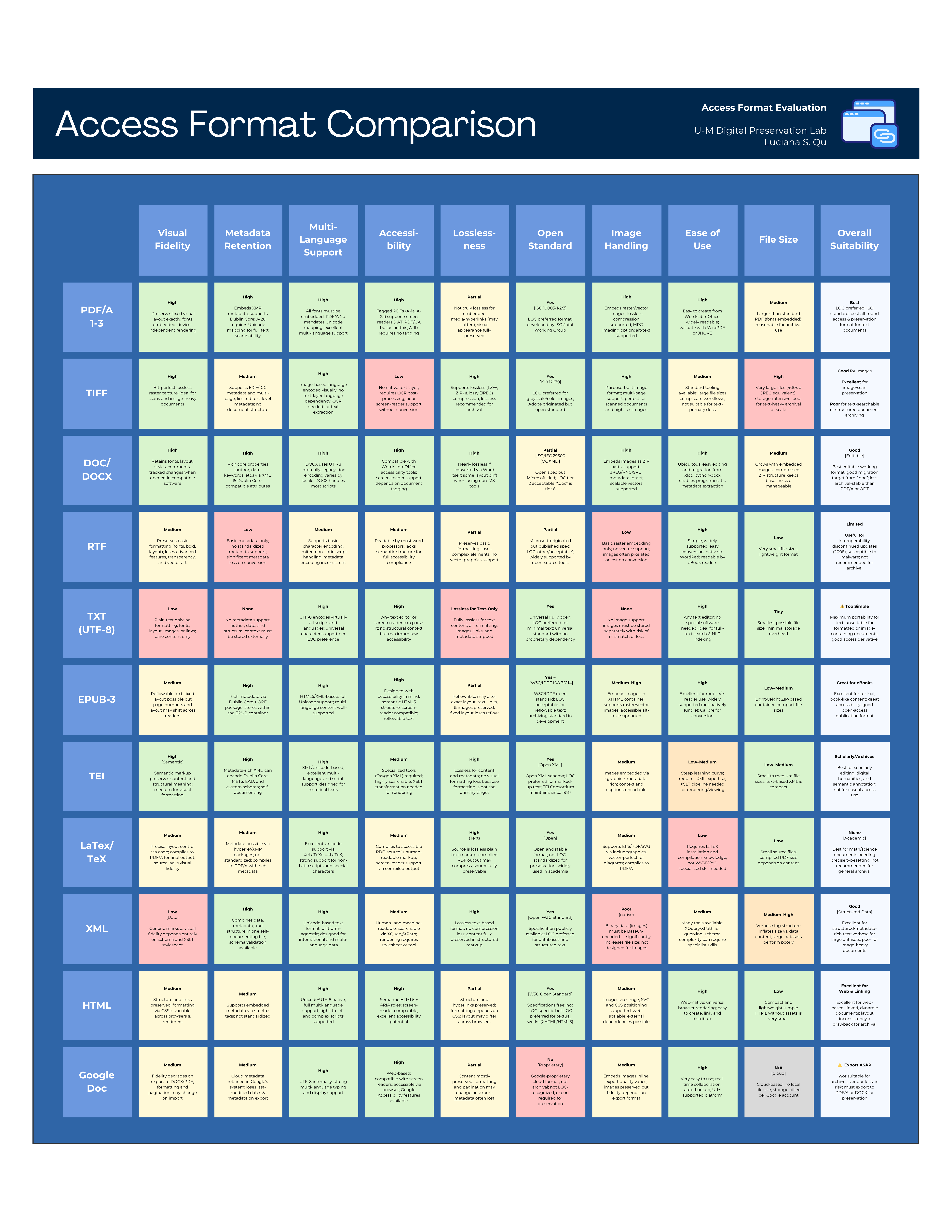
Figure 2. Access Format Comparison Matrix: All 11 candidate formats evaluated across ten criteria. Full details are available in the repository. View in Repository

The file size question. And why 2u looks better than u’d expect.
Lance flagged in his post that our PDF/A files were coming out 2–10x the size of the original Word documents and called it a “yikes.” He wasn't wrong. But I want to add some context that reframes that number a bit.
For comparison, I also measured file size multipliers for PDF/A-1b, the format variant most commonly used in digital preservation. PDF/A-1b is based on an older PDF spec (1.4) than 2u (1.7) and tends to produce significantly larger files due to how it handles font embedding and other overhead.
Across our 161 test files (all DOC/DOCX originals from a real archival collection), here's what we found:
PDF/A-2u
- Median File Size Multiplier: 6.6x
- Average Multiplier: 13.4x
- Min Multiplier: 1.0x
- Max Multiplier: 41.8x
PDF/A-1b
- Median File Size Multiplier: 27.7x
- Average Multiplier: 31.0x
- Min Multiplier: 3.1x
- Max Multiplier: 76x
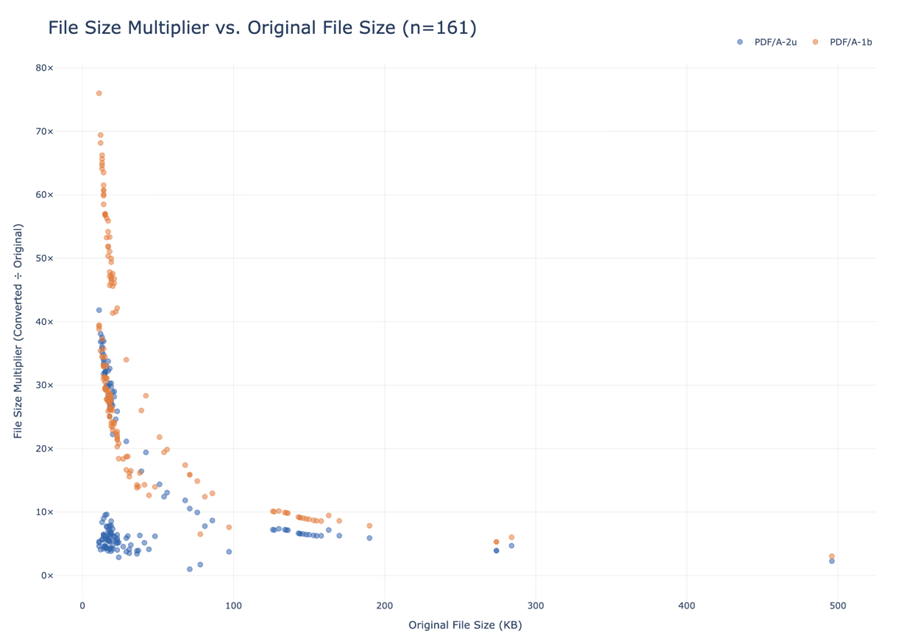
Figure 3. File size multiplier vs. original file size for 161 test files. Smaller originals incur disproportionately larger multipliers under both formats. PDF/A-2u consistently produces smaller outputs than PDF/A-1b across the full range. View in Repository
The difference is substantial. A file that balloons to 6-7x its original size under PDF/A-2u might be 28-30x under PDF/A-1b. The outliers are even more dramatic: one file that was 13 KB as a DOC came out as a 988 KB PDF/A-1b — a 76x increase — but “only” 42x under PDF/A-2u.
There's also an interesting pattern in the data: the smaller the original file, the larger the multiplier tends to be. This makes sense. PDF/A has inherent overhead (e.g., embedded fonts, metadata structures) that hits small files disproportionately hard. Larger documents spread that overhead across more actual content, so the multiplier shrinks.
None of this makes the storage increase good. But it does suggest that comparing PDF/A-2u to a “do nothing” baseline isn't the whole picture. If the alternative were PDF/A-1b, we'd be looking at roughly 4x the storage footprint for equivalent preservation properties.
What the accessibility checker actually tells you.
Adobe Acrobat's built-in Accessibility Checker is a useful tool, but it's worth being clear about what it does and doesn't catch. Running a full accessibility check on our converted files consistently flagged areas that require human review: reading order, meaningful alt text for images, table structure; and those flags were legitimate. Automated tools can verify that something is tagged; but they cannot verify that the tags are meaningful.
We also tested Adobe's cloud-based auto-tagging feature (enabled under Preferences > Accessibility). The expectation was that it might noticeably improve tagging quality. In practice, for our use case and file volume, the results were not significantly different whether the setting was on or off.
Power consumption across the full 161-file batch was effectively unchanged at around 0.1 kWh – a small but meaningful data point. Digital preservation infrastructure is rarely evaluated through an environmental lens, yet Pendergrass et al. (2019) argue that sustainable practice requires attending not just to financial and staffing sustainability, but to the environmental impact of the work itself [1]. Measuring energy use at the workflow level, even for a modest batch, is a step toward making those costs visible.
The takeaway is that PDF/A-2u's Unicode support does meaningfully improve screen-reader compatibility and text searchability, but it does not make a document fully accessible on its own. If accessibility compliance (for example, PDF/UA) is a firm requirement, that will require a separate workflow with additional labor involved.
Metadata: What survives conversion, and why some loss is expected.
One of the more technically interesting parts of this project was comparing metadata between original DOC/DOCX files and their PDF/A-2u outputs. We used ExifTool to extract per-file metadata as CSVs, then a Python script to compare them field by field and classify each as unchanged, modified, added, or removed.
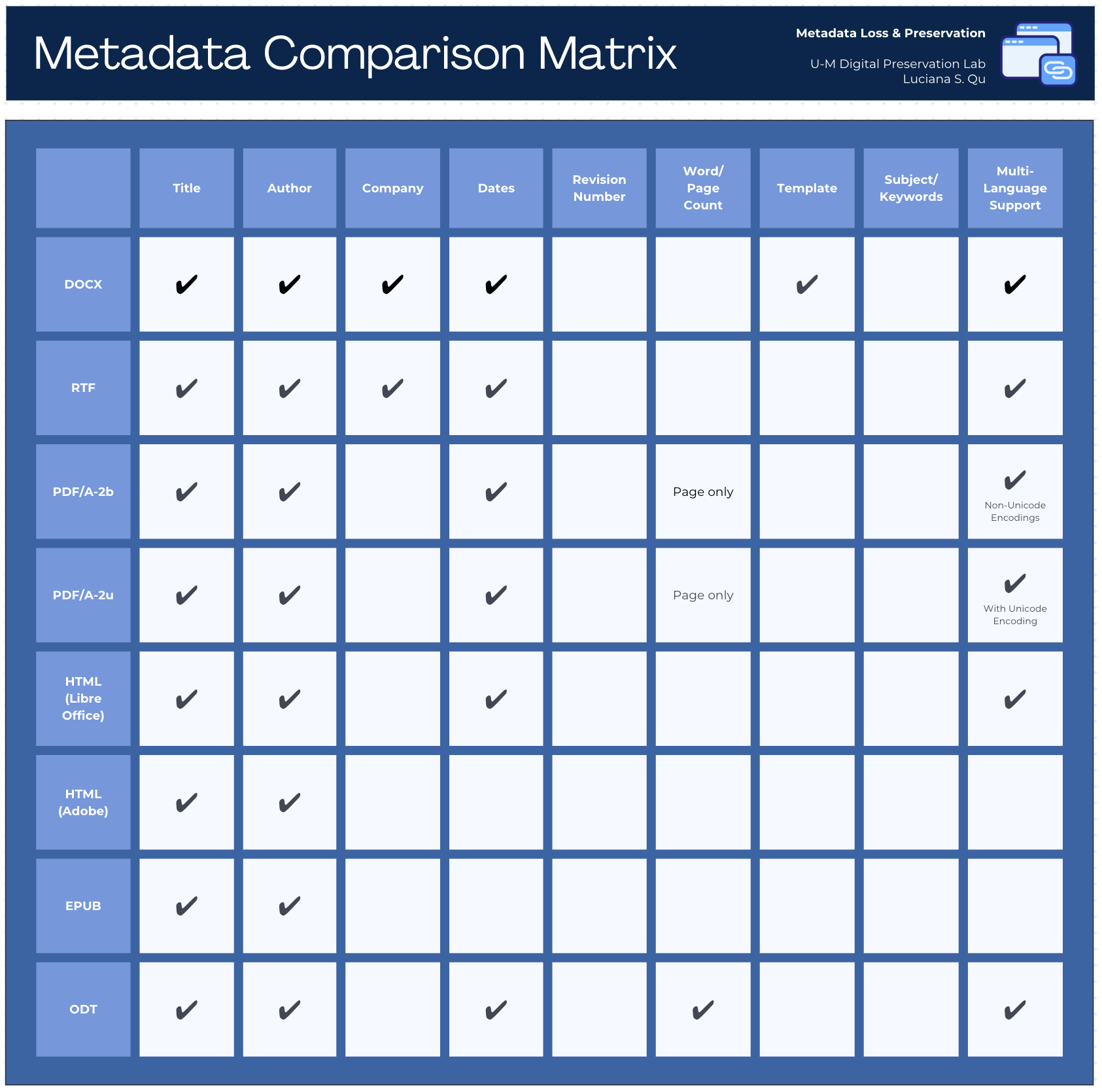
Figure 4. Metadata Comparison Matrix: Which metadata fields survive conversion across eight output formats. PDF/A-2u retains title, author, and dates, with full Unicode encoding for multi-language support. View in Repository

The short version: some metadata survives cleanly (title, author, creation date, keywords), some is modified in expected ways (software-specific fields that don't have PDF equivalents), and some is genuinely lost. The key interpretive point is that DOC/DOCX and PDF/A have different metadata schemas. This means that a field “disappearing” in conversion doesn't always mean information was lost, it may mean the field simply has no equivalent in the target format.
This reinforced what we already knew conceptually: access formats are not a replacement for preserving the original files. The DOC/DOCX originals stay in the preservation package alongside the PDF/A-2u derivatives, and the metadata from the originals remains authoritative.
A Newer Option: Gotenberg
One honest limitation of everything described above is that it relies on Adobe Acrobat Pro. Adobe works, and the outputs are high quality; but it's proprietary, expensive, prone to crashing during large batch jobs, and slow compared to alternatives.
Toward the end of my research, we started testing Gotenberg, an open-source document conversion service that runs via Docker and can be called from a Python script. It's significantly faster than Adobe and, in our testing, much more stable for batch processing with a high number of files.
The tradeoff is format: Gotenberg uses LibreOffice under the hood and can currently only convert to PDF/A-2b, not PDF/A-2u. In our earlier research, we found that LibreOffice conversions were noticeably lower quality than Adobe conversions, particularly around metadata retention. Gotenberg, which wraps LibreOffice, shares those limitations.
That said, PDF/A-2b is a legitimate preservation format. For collections where Unicode multi-language support is less of a priority, or where Adobe's instability is a practical blocker, Gotenberg is worth serious consideration. We're continuing to evaluate it, and we've documented the setup in the GitHub repository for institutions who want to try it.
What's in the GitHub Repository
The GitHub repository created specifically for this project, github.com/lquuu/pdfa-conversion-workflows, is more than a code drop. It documents the full workflow from file receipt through archival packaging; and is intended to be useful to other institutions thinking through similar questions.
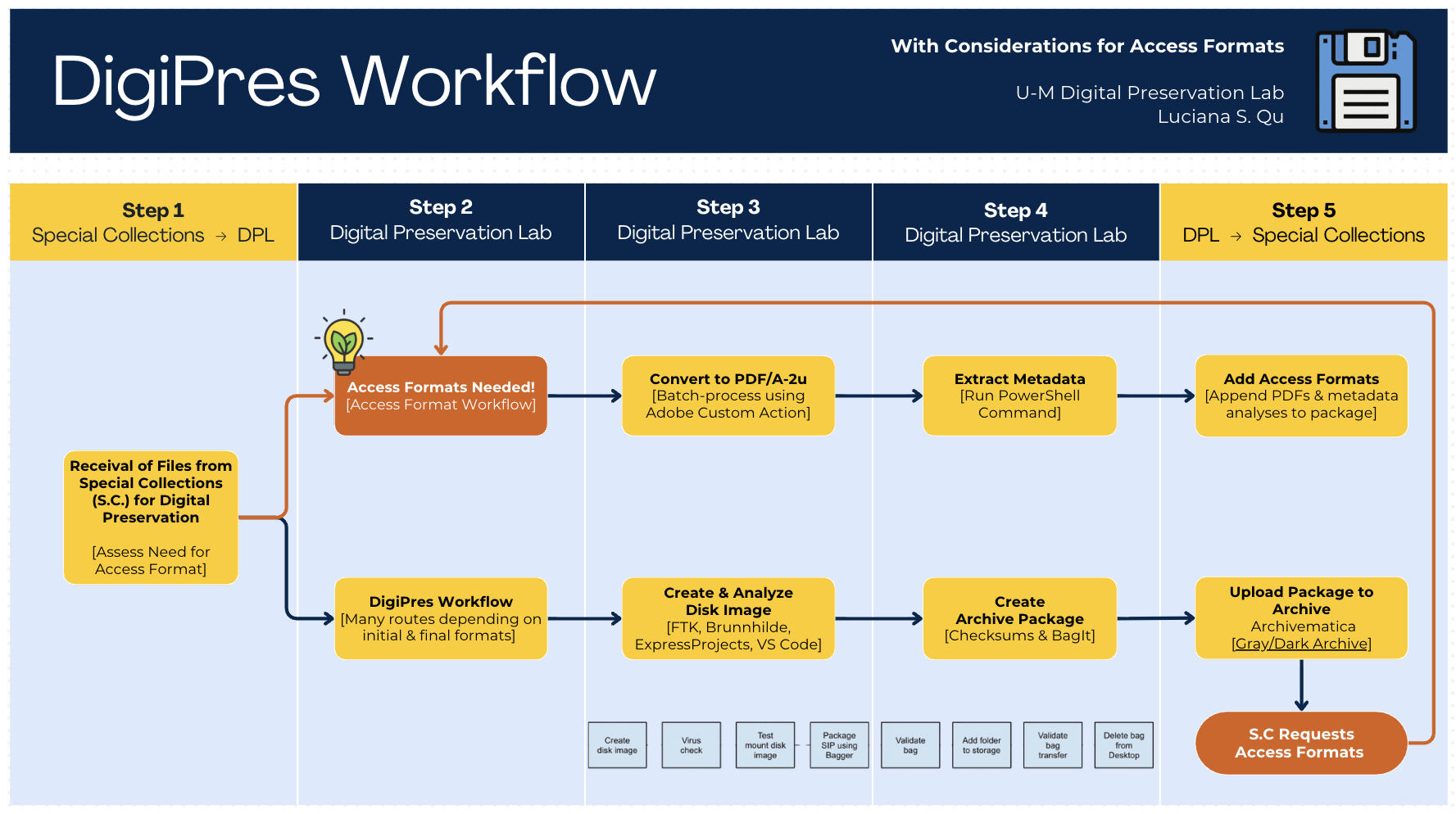
Our new DigiPres Workflow
The workflow diagram above gives a sense of the scope. Specifically, the repository includes:
- Batch conversion scripts for both the Adobe Custom Action and tested Gotenberg workflows
- Python metadata extraction and comparison scripts using ExifTool
- Accessibility evaluation procedures and results from the 161-file test batch
- File size analysis data with an interactive Plotly visualization
- Full test documentation and outputs from three sample documents, drawn from multiple collections
Everything is structured to be adaptable. If your institution is working through a similar decision – whether about format selection, tool choice, or how to handle metadata loss – the repository is meant to give you something concrete to build from, not just a methodology to read about.
What's Still Open
This research produced working, documented workflows; but it also surfaced questions we haven't fully resolved:
- At what scale does the manual accessibility review become a bottleneck, and what would a realistic remediation workflow look like?
- Is PDF/UA compliance achievable within a reasonable labor budget, and for which collections would it be worth it?
- As we process more collections, how does the file size impact accumulate; and how does it interact with our sustainability goals?
- Can Gotenberg's LibreOffice-based conversion quality be improved enough to make it a primary workflow, or will it remain a fallback?
While these questions don't have answers yet, I think they're the right ones to be asking. The workflows are documented, the test data is available, and the GitHub repository is public for anyone who wants to adapt this work to their own institutional context.
[1] Pendergrass, K. L., Sampson, W., Walsh, T., & Alagna, L. (2019). Toward Environmentally Sustainable Digital Preservation. The American Archivist, 82(1), 165–206. https://www.jstor.org/stable/48659833